Blog
Credits and usage visibility for Hex Agents
We’re rolling out monthly credit grants for Hex Agents, plus new ways to monitor usage and buy add-on credits.

Since we launched the Hex Agent last fall, it’s become the most capable analytics agent on the market. Every month, companies from startups to Fortune 500s trust the Hex Agent with millions of business-critical data tasks.
Agents have actually become the primary mode of working in Hex, surpassing manual notebook cell creation and point-and-click exploration.
Now, we’re introducing a credit model that allows us to continue providing this experience, along with new ways to monitor usage and purchase add-on credits.
How it works
All paid plans now include a credit grant to get users started with AI in Hex.
Admins can then purchase pooled add-on credits by enabling auto top-ups to refill your balance as-needed. You can set a workspace-wide spend limit to stay in budget, and manage user-level credit limits at the workspace, group, or individual level. Change your mind later? No sweat, updates take effect immediately. Full details are in the docs.
Existing customers will automatically move to this model with a grace period (annual contracts will need to be updated). New customers automatically start on this model.
Effort-based consumption
Hex agents use credits based on effort — the complexity of the task, the amount of context the agent needs to process, and the resources required to complete it.
This means simple questions cost very little, while more involved analyses cost more. A few illustrative examples:
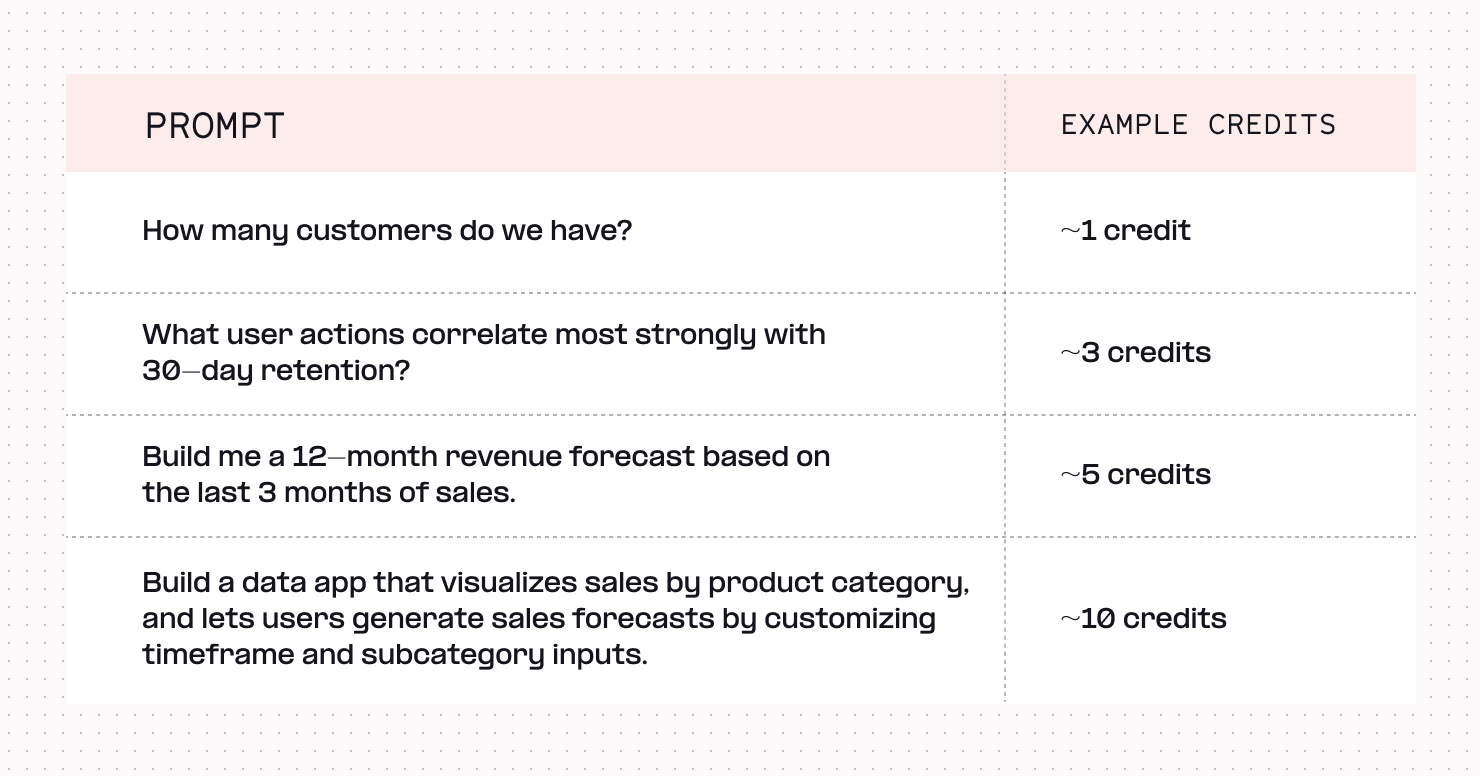
One big focus area for us is cost efficiency. We’re constantly evaluating frontier and lower-cost models, choosing models that strike the best balance of accuracy and cost.
We do this at a per-task level, too, using our subagent architecture. For example, some lower-cost models are already at parity with frontier models on search or simple data viz — so we direct traffic to those cheaper models, and reserve the expensive ones for jobs where their performance is worth the premium.
The result: your credits go further over time, and you’re not locked in to one model provider.
You don't have to leave that entirely to us, either. The model picker lets you choose exactly which model powers your session, and how much effort the agent should exert:
- Fable 5 and Opus 4.7 for your hardest, most open-ended analyses
- GPT 5.5 as a comparable alternative to Opus
- Sonnet 4.6 for everyday work
- Kimi 2.7, for Opus-level performance at less than half the cost
Not sure where to start? "Auto" is our out-of-the-box default, and it picks the best model for the task based on our own evals. Admins can also set a different model as the org-wide default, if that's a better fit for how your team works. For more on when to reach for each one, see Model Picker Best Practices.
Full visibility
While this sort of effort-based model has become commonplace, Hex provides a unique degree of control to understand and influence your team’s credit consumption.
Users can view their credit balance at any time and monitor usage right down to the prompt level — click the three-dot menu on any completed agent task to see exactly what it cost.
Admins get the wider view: a snapshot of every paid user's monthly credit balance, historical usage logs, add-on credit options, and workspace spend limit settings, all in one place.
And Admins can go even deeper with credit usage visibility in the Context Studio — a great way to understand what topics users are relying on AI for, and to identify domain areas that could use more context curation. Managers and Admins can see what questions users are asking, which topics come up most, and where Hex Agents express uncertainty or raise warnings — all tied together neatly with proactive context suggestions.
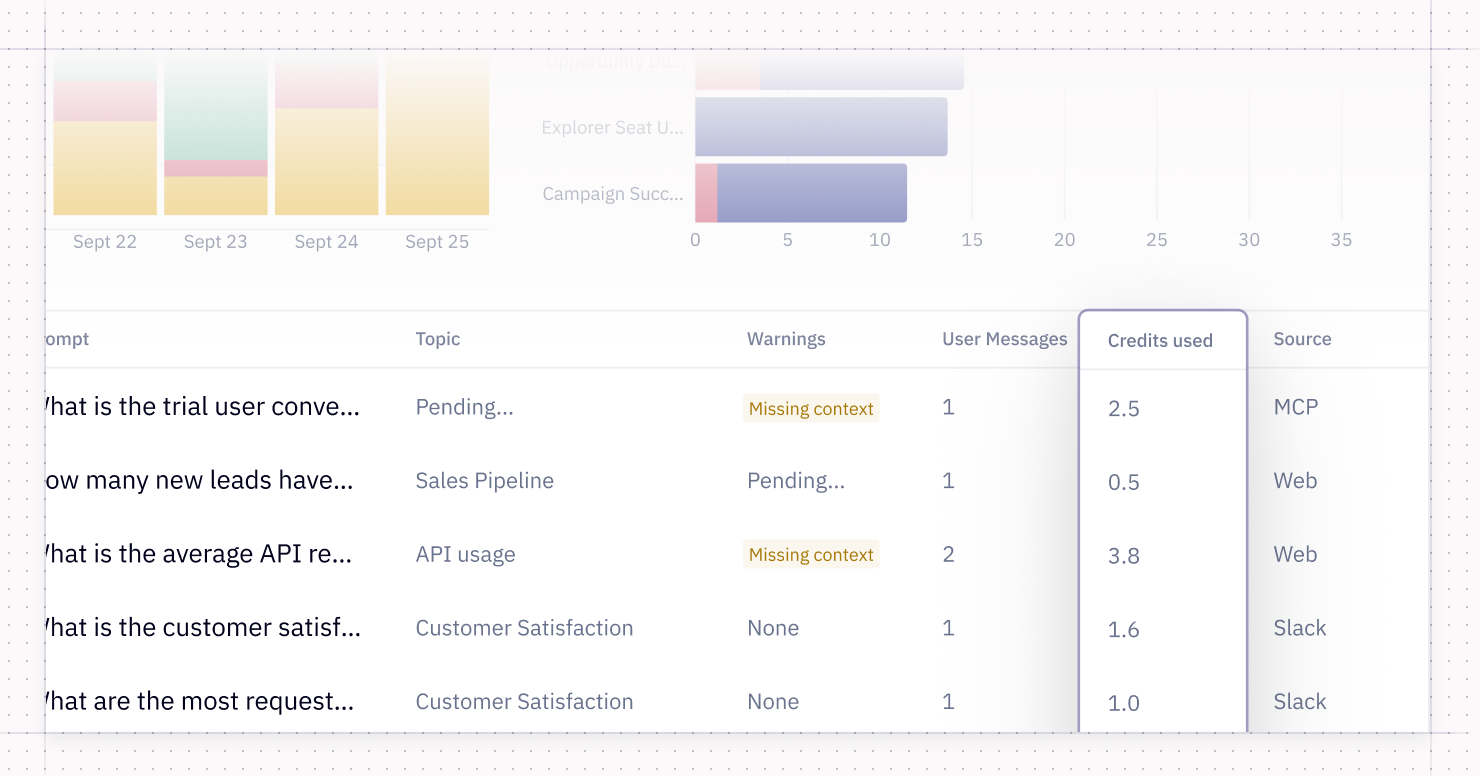
Data teams use that signal to tune context, update data definitions, and test changes before publishing. This drives better data accuracy for users, and better credit efficiency for agents.
As organizations adopt AI more broadly, leaders are looking for better ways to understand the costs, so they can budget effectively and calculate ROI — and we are excited to give them ways to do that.
Looking for some ways to optimize credit usage? Our Head of Data, Katie, wrote about tactics to ensure optimal credit efficiency here.
Questions? Reach out at support@hex.tech or visit our docs.
If this is is interesting, click below to get started, or to check out opportunities to join our team.
